10 Cookie Consent Banners with Shadcn UI (GDPR Compliant)
Browse 10 cookie consent banner components for React and Next.js — simple accept/reject bars, preference management panels, category-based consent, and animated slide-in banners. Built with Shadcn UI and Tailwind CSS for GDPR and CCPA compliance.
SERP Blocks Team
Product
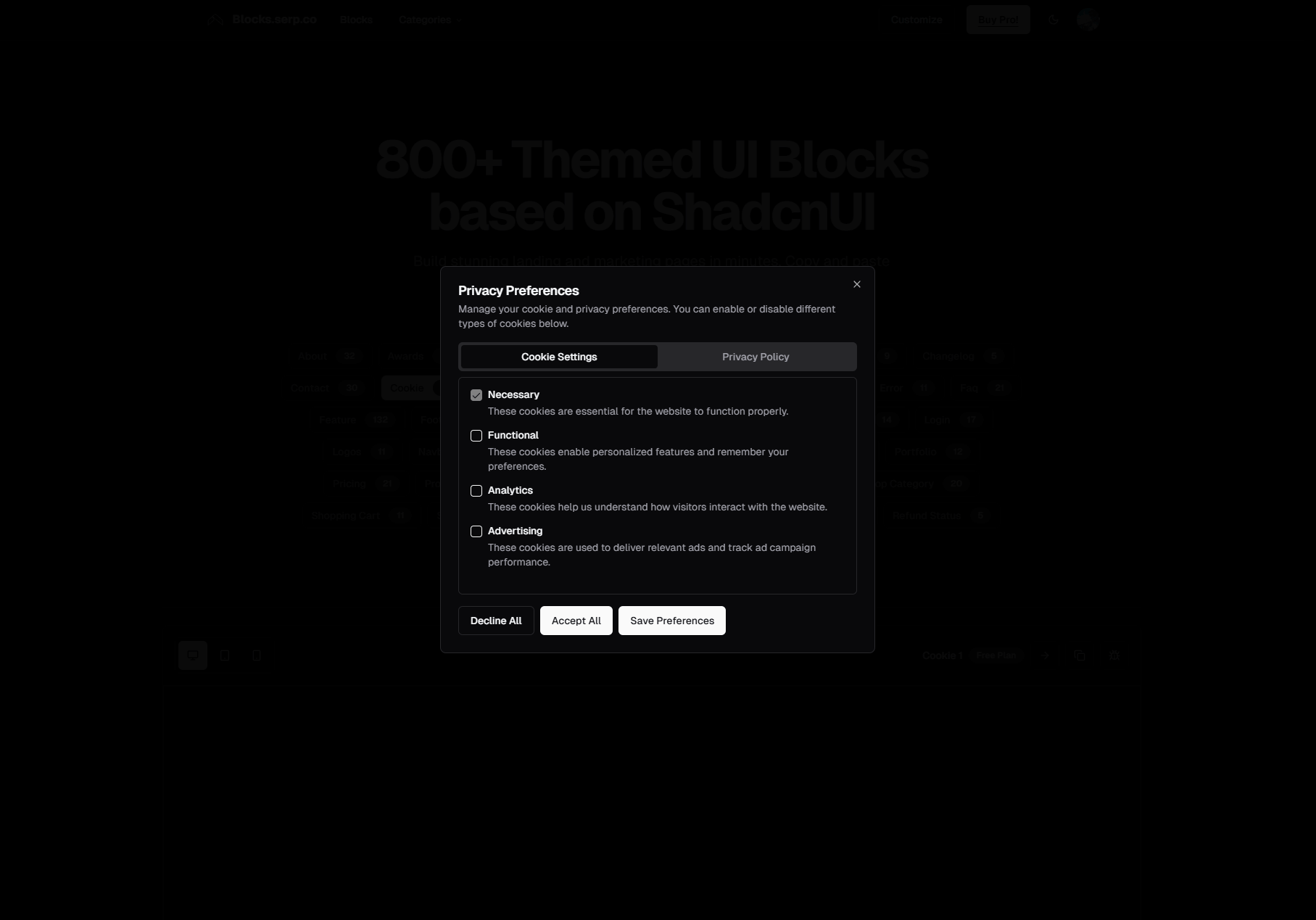
Cookie consent banners are the least glamorous UI component on your website, and also one of the most legally important. Since the EU's GDPR took effect in 2018, every website that serves European visitors needs informed consent before setting non-essential cookies. California's CCPA, Brazil's LGPD, Canada's PIPEDA, and a growing list of national privacy laws have extended similar requirements worldwide. Getting cookie consent wrong exposes you to fines, legal complaints, and broken analytics.
Yet most developers treat cookie banners as an afterthought — a generic bar at the bottom of the page with an "Accept All" button and no real configuration. That approach might have passed in 2019, but privacy enforcement has matured. Regulators now check whether your consent mechanism offers genuine choice, whether you respect those choices in your actual cookie behavior, and whether the consent flow is designed to manipulate users into accepting everything.
The SERP Blocks cookie collection includes 10 cookie consent components — from simple accept/reject bars to full preference management panels with category-based controls. Each component is built with Shadcn UI and Tailwind CSS, providing accessible, styled consent flows that you can integrate into any React or Next.js application.
The Legal Landscape in 2026
Cookie consent requirements vary by jurisdiction, but the trend is clear: more countries are adopting stricter rules, enforcement is increasing, and the penalties for non-compliance are growing.
GDPR (European Union)
The General Data Protection Regulation remains the gold standard for privacy legislation. Its cookie consent requirements are specific:
Prior consent — Non-essential cookies cannot be set before the user provides consent. This means your analytics scripts, marketing pixels, and third-party embeds should not fire until the user explicitly opts in.
Informed consent — Users must understand what they're consenting to. Vague language like "we use cookies to improve your experience" is insufficient. You need to explain the categories of cookies, their purposes, and who receives the data.
Freely given — Consent must be a genuine choice. Cookie walls that block content unless the user accepts all cookies are generally considered non-compliant. Pre-checked consent boxes violate the requirement for affirmative action.
Withdrawable — Users must be able to change or withdraw consent as easily as they gave it. A visible "Cookie Settings" link in your footer or a persistent icon that reopens the consent panel satisfies this requirement.
Documented — You must be able to demonstrate that consent was obtained. Store consent records with timestamps, the specific version of your consent text, and the choices the user made.
Fines under GDPR can reach 4% of global annual revenue or 20 million euros, whichever is higher. In practice, cookie consent violations have resulted in fines ranging from tens of thousands to hundreds of millions of euros. The French data protection authority (CNIL) fined Google 150 million euros in 2022 specifically for cookie consent violations.
CCPA / CPRA (California)
California's privacy framework takes a different approach. Rather than requiring opt-in consent before setting cookies, CCPA requires that you give users the right to opt out of the sale or sharing of personal information. For websites using advertising cookies and analytics that share data with third parties, this means providing a "Do Not Sell or Share My Personal Information" link and honoring Global Privacy Control (GPC) signals sent by browsers.
Since the CPRA amendments took effect in 2023, California also requires an opt-in for sensitive personal information and expanded the definition of sharing to include cross-context behavioral advertising.
Other Jurisdictions
LGPD (Brazil) — Requires a legal basis for data processing, with consent as one option. Consent must be free, informed, and unambiguous.
POPIA (South Africa) — Requires justification for processing personal information, including cookies that identify or track users.
PDPA (Thailand) — Requires consent for cookies that are not strictly necessary for the service.
DPDP Act (India) — India's 2023 Digital Personal Data Protection Act requires notice and consent for data processing, with specific provisions for cookies that collect personal data.
The safest approach is to implement a robust consent mechanism that meets the strictest requirements (GDPR) and adapt the display for other jurisdictions. All 10 SERP Blocks cookie components support this approach.
Cookie Categories
Effective cookie consent goes beyond a binary accept/reject. Category-based consent lets users approve some types of cookies while declining others — and this is what GDPR regulators expect to see.
Strictly Necessary Cookies
Cookies required for the website to function. Session identifiers, authentication tokens, shopping cart persistence, CSRF protection tokens, and load balancer cookies fall into this category. These cookies do not require consent under GDPR because they're essential to providing the service the user requested.
Your consent banner should list strictly necessary cookies for transparency, but the toggle should be locked in the "on" position — the user should see that these cookies exist and understand their purpose, but cannot disable them without breaking the site.
Analytics Cookies
Cookies that collect information about how visitors use your website — page views, session duration, bounce rate, traffic sources, and user journeys. Google Analytics, Plausible, PostHog, Mixpanel, and Hotjar all set cookies in this category.
Analytics cookies require consent under GDPR. Many site owners assume analytics is "necessary," but regulators disagree. Understanding how visitors use your site is valuable to your business, but it's not necessary for the visitor to receive the service they requested.
Consent-aware analytics implementation means your tracking scripts should not load until the user has opted into the analytics category. If the user declines analytics cookies, those scripts never execute, and no analytics data is collected for that visit.
Marketing Cookies
Cookies used for advertising, retargeting, and cross-site tracking. Facebook Pixel, Google Ads remarketing, LinkedIn Insight Tag, and similar tools set cookies that follow users across websites to build advertising profiles.
Marketing cookies are the most privacy-invasive category and the most scrutinized by regulators. Consent rates for marketing cookies are typically the lowest — many users accept analytics but decline marketing. Your consent mechanism must respect this granular choice.
Functional Cookies
Cookies that enable enhanced functionality beyond the basic service — language preferences, theme settings (dark mode), video player preferences, chat widget state, and similar personalization. These cookies make the experience better but aren't strictly necessary.
Functional cookies occupy a gray area in GDPR compliance. Some regulators classify them as necessary (since they serve the user's explicit preferences), while others require consent. Including them as a separate consent category with a clear explanation is the safest approach.
Cookie Consent Banner Patterns
The 10 SERP Blocks cookie components cover the full spectrum of consent interfaces, from minimal bars to comprehensive preference panels.
Simple Accept/Reject Bar
The most basic pattern: a horizontal bar fixed to the bottom (or top) of the viewport with a brief message, an "Accept" button, and a "Reject" button. No categories, no granular controls — just a binary choice.
This pattern works for:
Small sites with minimal cookie usage
Sites that only set strictly necessary and analytics cookies
Applications where simplicity matters more than granular consent
Design considerations for accept/reject bars:
Equal button prominence — GDPR requires that rejecting cookies should be as easy as accepting them. Both buttons should have equal visual weight. An "Accept All" button in bright primary color next to a barely visible "Reject" text link fails the "freely given" requirement.
Clear, concise copy — "We use cookies for analytics to understand how you use our site" is better than "We use cookies to improve your experience." Specificity builds trust and satisfies the informed consent requirement.
Privacy policy link — Include a link to your full cookie policy where users can read detailed information about each cookie, its purpose, and its expiry.
Bottom Banner with Preferences Link
A compact bottom bar with "Accept All," "Reject All," and a "Manage Preferences" link that opens a detailed settings panel. This is the most common pattern on the web in 2026 because it balances simplicity (most users will click Accept or Reject) with depth (users who want granular control can access it).
The preferences panel, typically rendered as a modal or slide-over, contains:
A list of cookie categories with toggle switches
A description of each category explaining what cookies it includes and why
A list of specific cookies within each category (optional but recommended for transparency)
"Save Preferences" and "Accept All" buttons
This pattern pairs naturally with the modal collection (13 blocks). The cookie consent banner acts as the trigger, and the preferences panel renders inside a dialog overlay. Shadcn UI's Dialog component provides the accessible foundation — focus trapping, keyboard navigation, and screen reader support — while the cookie-specific content handles the compliance logic.
Full-Width Floating Card
A card-style consent notice that floats above the page content, typically anchored to the bottom of the viewport with margin on all sides. The card includes a headline, description, category toggles, and action buttons all in a single view — no secondary panel needed.
This pattern eliminates the two-step flow (banner then preferences panel) by showing everything at once. It takes up more screen real estate but reduces the number of interactions needed to configure consent. For sites that want to be maximally transparent on first impression, this is the most effective layout.
Full-width floating cards work particularly well on desktop viewports where the additional height is less intrusive. On mobile, consider collapsing the category details behind expandable sections to keep the initial card compact.
Animated Slide-In Banner
A consent notice that slides in from the bottom-left or bottom-right corner of the viewport after a short delay. The animation draws attention without the abruptness of a bar that appears instantly on page load. A subtle entrance animation (150-300ms slide-up with fade) signals that the element is new without feeling jarring.
Slide-in banners typically use a compact card format with a smaller footprint than full-width bars. They include the essential elements — message, accept button, reject button, preferences link — in a contained panel that doesn't span the full viewport width.
Timing the slide-in animation matters. A consent banner that appears before the page content has loaded feels obstructive. A banner that slides in 1-2 seconds after the page loads gives the user a moment to orient before asking for consent. However, remember that under GDPR, non-essential cookies should not be set during that delay — the delay is purely for the UI animation, not for sneaking in tracking before consent.
Centered Modal Consent
A centered modal overlay that appears on first visit, dimming the background and presenting the consent interface as a focused dialog. This is the most attention-demanding pattern and should be used carefully — modal consent banners can feel like cookie walls if not implemented correctly.
The key difference between a compliant modal consent and an illegal cookie wall is whether the user can dismiss it without accepting. A modal that can be closed (via a close button, backdrop click, or Escape key) and defaults to no consent is compliant. A modal that blocks all page interaction until the user accepts is not.
Modal consent interfaces work well when you need to present significant information about your cookie usage — detailed category descriptions, long lists of third-party services, or jurisdiction-specific notices.
Top Strip Consent
A narrow strip at the very top of the page — above the navigation header — with a condensed consent message and buttons. This pattern is less common than bottom banners but has advantages: it doesn't obscure content or CTAs at the bottom of the viewport, and it integrates visually with banner and announcement bar components (20 blocks) that already occupy the top-of-page position.
Top strip consent works well on sites that already use announcement banners. The cookie consent strip replaces the announcement bar for first-time visitors, then transitions to the normal announcement banner once consent is recorded.
Implementation Architecture
Consent State Management
Cookie consent state needs to persist across page loads and sessions. The standard approach is storing consent in a cookie itself (specifically a strictly necessary cookie, since it's required for the site to function correctly with respect to the user's privacy preferences).
The consent cookie should store:
Consent status — Accepted, rejected, or granular category preferences
Timestamp — When consent was given, for compliance records
Version — The version of your consent text, so you can re-prompt if the text changes
Categories — Which specific categories were accepted and rejected
A typical consent cookie value looks like a JSON-encoded string: {"necessary":true,"analytics":true,"marketing":false,"functional":true,"timestamp":"2026-03-17T10:30:00Z","version":"2.1"}.
Script Loading Based on Consent
The consent mechanism only works if it actually controls script loading. Setting a consent cookie but loading Google Analytics regardless defeats the purpose and violates GDPR.
Implementation approaches:
Conditional script tags — Render analytics and marketing script tags only when the corresponding consent category is active. In Next.js, use the
Scriptcomponent with conditional rendering based on consent state.Tag manager integration — Google Tag Manager, Segment, and similar tools support consent modes. Configure them to check consent state before firing tags. Google's Consent Mode v2 reads consent signals and adjusts tag behavior (suppressing cookies, sending anonymized pings, or blocking entirely) based on the user's choices.
Custom event system — Dispatch a custom event (
consent-updated) when the user saves preferences. Analytics and marketing scripts listen for this event and initialize only when their category is approved.
Server-Side Consent Handling
For server-rendered applications (Next.js with App Router), consent state affects server-side behavior too. If your server sets cookies during SSR or calls third-party APIs that share user data, those operations need to check consent state.
Read the consent cookie in your server components or middleware. If consent hasn't been given, strip any non-essential cookies from the response and avoid calling analytics or marketing APIs during the server render.
GDPR Compliance Checklist
Use this checklist to verify your cookie consent implementation meets GDPR requirements:
No non-essential cookies are set before consent — Verify by opening your site in an incognito window and checking the browser's cookie storage before interacting with the consent banner.
Accept and reject options have equal prominence — Both buttons should be the same size and visual weight. Do not hide "Reject" behind a preferences panel while making "Accept All" a single click.
Granular category controls are available — Users should be able to accept analytics but reject marketing, or vice versa.
Consent is stored with a timestamp and version — Your consent record should be defensible in an audit.
Users can change consent later — A "Cookie Settings" link in the footer (21 blocks) or a persistent cookie icon opens the consent panel for preference changes.
Privacy policy is linked — The consent banner includes a link to your full cookie policy.
Consent is re-requested when the policy changes — If you add new cookie categories or third-party services, increment the consent version and show the banner again.
GPC signals are respected — If the browser sends a Global Privacy Control header, treat it as an opt-out for CCPA purposes.
Cookie Consent and Analytics Integration
Implementing consent-aware analytics requires coordination between your consent mechanism and your tracking setup. Here's how common analytics tools handle consent.
Google Analytics 4
GA4 supports Google Consent Mode v2, which adjusts data collection based on consent signals. When analytics consent is denied, GA4 sends "cookieless pings" — anonymized signals that model conversions and traffic without setting cookies or collecting personal data. This gives you partial analytics even when users decline, while respecting their privacy choices.
Configure Consent Mode in your GA4 setup and connect it to your cookie consent component's state. When the user accepts analytics cookies, update the consent signal to granted. When they decline, set it to denied.
Plausible and Privacy-First Analytics
Plausible, Fathom, and similar privacy-first analytics tools are designed to work without cookies entirely. They use hashed, anonymized identifiers that don't persist across sessions and don't constitute personal data under most interpretations of GDPR.
If your analytics tool genuinely uses no cookies and processes no personal data, you may not need consent for analytics at all. However, this is a legal judgment — consult with a privacy professional for your specific implementation. Including cookieless analytics in your consent banner anyway demonstrates good faith and gives users maximum control.
Marketing Pixels and Retargeting
Facebook Pixel, Google Ads, LinkedIn Insight Tag, and similar marketing tools are the most privacy-sensitive integrations. They share data with third parties for advertising purposes, which requires explicit consent under GDPR and triggers opt-out rights under CCPA.
These scripts should be completely blocked until marketing consent is granted. Unlike analytics (which may have cookieless fallbacks), marketing pixels without cookies are effectively useless — their purpose is to identify and track users across sites, which is exactly what cookie consent laws restrict.
Styling and UX Best Practices
Visual Hierarchy
The consent banner should be noticeable without dominating the page. Common styling approaches:
Muted background — A subtle background color (light gray, off-white, or a muted tint of your brand color) that distinguishes the banner from page content without screaming for attention.
Consistent typography — Use the same font family and sizes as the rest of your site. The banner is part of your UI, not an alien overlay.
Accessible contrast — Text must meet WCAG AA contrast requirements (4.5:1 for body text, 3:1 for large text). This applies to button text, link text, and body copy within the banner.
Dark Mode Support
If your site supports dark mode, your cookie consent banner must support it too. A bright white banner flashing on a dark page at midnight is a poor user experience. Shadcn UI's theming system handles this automatically — components respect the current theme context, so a cookie banner built with Shadcn primitives inherits dark mode without additional work.
Animation and Transitions
Subtle entrance and exit animations improve the perceived quality of the consent interaction:
Entrance — Slide up from below the viewport edge, with a slight opacity fade. Duration: 200-300ms. Easing:
ease-out.Exit — Slide down and fade out after the user makes a choice. Duration: 150-200ms. Easing:
ease-in.Preference panel — If opening a modal for detailed settings, use Shadcn UI's Dialog enter/exit animations for consistency with other modals on your site.
Avoid animations that delay the user's ability to interact. The consent banner should be interactive as soon as it's visible — don't make users wait for an animation to complete before they can click Accept or Reject.
Related Block Categories
Cookie consent components integrate with these other block categories:
| Section | Category | Count |
| Cookie Consent | Cookie | 10 |
| Banners | Banner | 20 |
| Modals | Modal | 13 |
| Footers | Footer | 21 |
| Login Forms | Login | 17 |
| Settings Pages | Settings | 10 |
SERP Blocks includes 1200+ total blocks across 50+ categories. 60 are free, with the full library available through a one-time Pro purchase.