13 Product Review Components for Building Trust
Browse 13 product review components for React and Next.js — star ratings, verified reviews, photo reviews, review summaries with distribution charts, and aggregate rating displays. Built with Shadcn UI and Tailwind CSS for e-commerce trust signals.
SERP Blocks Team
Product
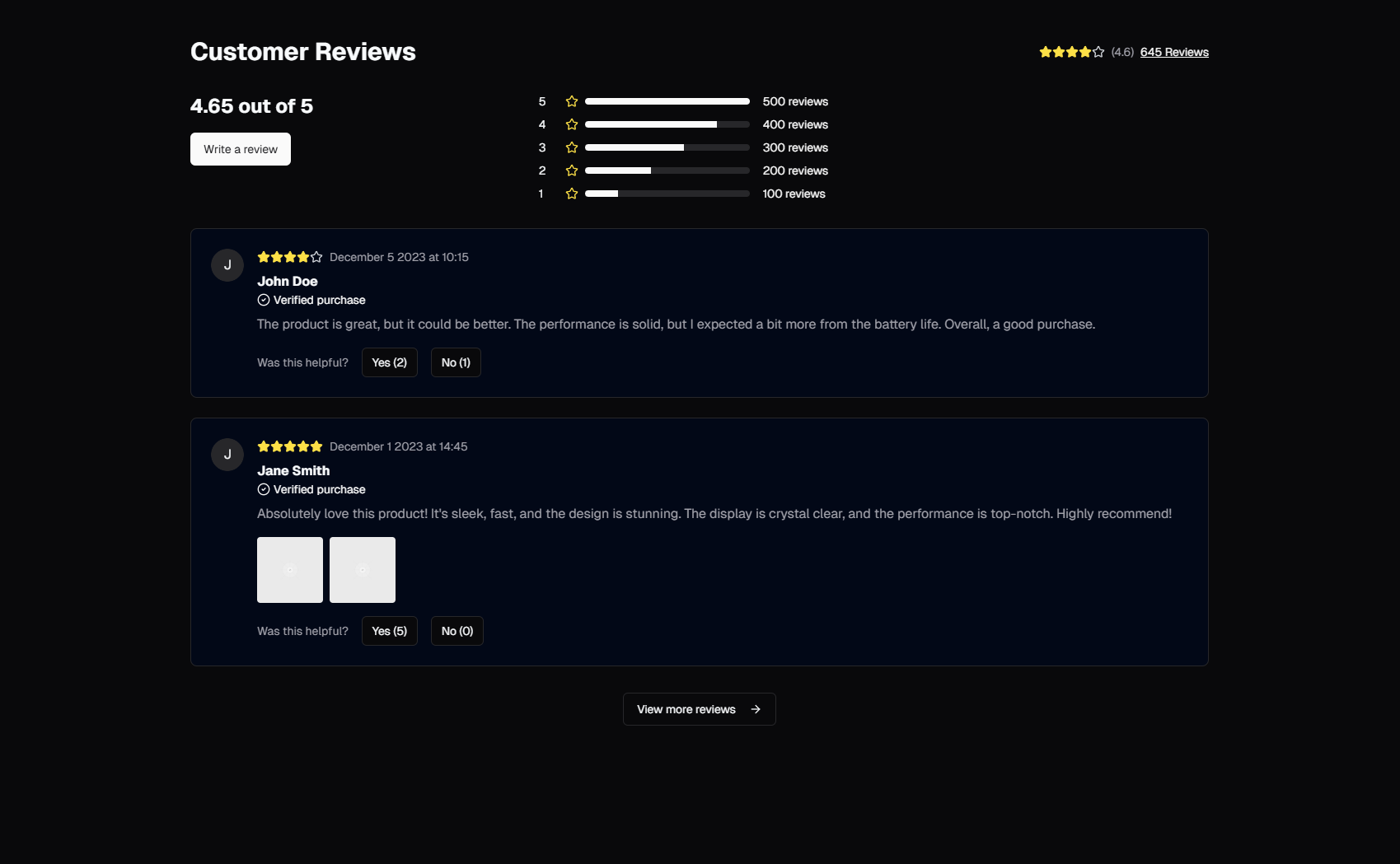
Product reviews are the most powerful trust signal in e-commerce. More powerful than brand reputation, more convincing than professional photography, more persuasive than any marketing copy a team could write. Ninety-three percent of consumers say online reviews influence their purchase decisions. Seventy percent will not buy a product without reading reviews first. A product with no reviews — regardless of how good it is — faces an uphill battle against a mediocre competitor that has fifty five-star ratings.
Yet most development teams treat the review section as an afterthought. They build the product pages, the checkout flow, the account dashboard, and then bolt on a generic review list at the bottom of the product detail page. No rating distribution chart. No photo reviews. No verified purchase badges. No sorting or filtering. Just a flat list of text and star ratings that does nothing to build buyer confidence.
The SERP Blocks reviews collection includes 13 review components built with Shadcn UI and Tailwind CSS. Star rating displays, verified review badges, photo review galleries, review summary cards with distribution histograms, and aggregate rating callouts — every pattern a modern e-commerce storefront needs to turn customer feedback into conversion fuel.
Why Reviews Drive Conversions
Before diving into the components themselves, it is worth understanding the psychology behind review-driven purchasing decisions. Reviews work because they provide three things that product descriptions cannot.
Social proof. Humans are wired to follow the behavior of others. When a product has hundreds of positive reviews, the implicit message is: "hundreds of people bought this, used it, and liked it enough to write about it." That signal is more convincing than any feature bullet point because it comes from people with no incentive to exaggerate.
Risk reduction. Every purchase is a risk assessment. Will this product work as described? Will it fit? Will it last? Reviews from real buyers answer these questions with specificity that marketing materials cannot provide. "I have been using this standing desk for six months and the motor is still silent" carries more weight than "whisper-quiet motorized adjustment" in a product description.
Expectation calibration. Reviews help buyers form realistic expectations. A product with a 4.2-star average and reviews that mention "great value for the price" sets a different expectation than a 4.9-star product described as "premium quality." Both can convert well — the key is that the buyer's expectations align with reality, which reduces returns and negative post-purchase reviews.
Review Component Patterns
Star Rating Displays
The star rating is the most recognized review element in e-commerce. Five stars, filled proportionally to represent the average rating. A 4.3-star product shows four fully filled stars and one star filled to roughly 30 percent.
Design details that matter in star ratings:
Fractional fill rendering — A 4.3 rating should visually differ from a 4.7 rating. Half-star increments are the minimum granularity. Smooth fractional fills (using CSS clip-path or gradient fills) provide more visual precision.
Color consistency — Gold or amber is the universal convention for filled stars. Deviating from this convention forces users to relearn the pattern. Gray or light gray for empty stars provides clear contrast without competing for attention.
Size hierarchy — The primary rating display on the product page should use large stars (24-32px). Star ratings in product list cards should use smaller stars (16-20px) that fit within the card layout without dominating it.
Numeric accompaniment — Always display the numeric rating alongside the stars. "4.3 out of 5" removes ambiguity about where the fractional fill lands. Include the total review count ("4.3 out of 5 — 847 reviews") so users can assess the reliability of the average.
Star ratings are not limited to product reviews. The testimonial collection (40 blocks) uses star ratings as part of customer testimonial cards, and the product blocks (25 blocks) integrate star ratings directly into product cards for quick at-a-glance quality signals during browsing.
Review Summary Cards
The review summary is the aggregate overview that appears above the individual review list. It combines the average star rating, total review count, and a rating distribution chart into a single visual block that answers the question: "is this product well-reviewed?"
A complete review summary includes:
Average rating callout — The overall average displayed prominently, typically as a large number (4.3) alongside filled stars. This is the first thing shoppers look at when scrolling to reviews.
Total review count — "Based on 847 reviews." Volume matters. A 5.0 average from 3 reviews is less convincing than a 4.3 average from 847 reviews.
Rating distribution histogram — Five horizontal bars showing what percentage of reviews gave 1, 2, 3, 4, or 5 stars. This distribution tells a story the average cannot. A product with 80 percent 5-star reviews and 15 percent 1-star reviews has a polarizing quality issue. A product with reviews clustered around 4 and 5 stars is consistently good.
Interactive filtering — Clicking a bar in the distribution chart filters the review list to show only reviews with that rating. Shoppers almost always click the 1-star bar first — they want to know the worst-case scenario before buying.
The distribution chart is the most underused review element. Most e-commerce sites show the average rating but skip the distribution. This is a mistake. The distribution provides nuance that the average obscures, and it gives shoppers the control to explore edge cases. Amazon popularized this pattern, and shoppers now expect it.
Individual Review Cards
Each review is a self-contained card displaying a single customer's feedback. The card structure accommodates varying amounts of content while maintaining visual consistency across the review list.
Standard review card elements:
Reviewer identity — Name (or username), avatar, and optionally their location or how long they have been a customer. Identity humanizes the review. A name and photo feel more trustworthy than anonymous text.
Star rating — The rating this specific reviewer gave, displayed as filled stars. This appears at the top of the card alongside the review title for immediate context.
Review title — A brief headline summarizing the reviewer's experience. "Perfect desk for small spaces" or "Broke after two months." Titles let shoppers scan quickly without reading full reviews.
Review body — The full text of the review. Longer reviews are truncated with a "Read more" toggle to keep the list scannable. A good truncation point is 3-4 lines of text — enough to convey tone and substance without overwhelming the layout.
Review date — When the review was written. Recent reviews carry more weight than year-old reviews because products, shipping, and customer service change over time. Display dates as relative time ("3 days ago") for recent reviews and absolute dates ("March 2026") for older ones.
Verified Purchase Reviews
A verified purchase badge signals that the reviewer actually bought the product through the platform. This distinction matters because unverified reviews could come from anyone — competitors, bots, people who never used the product. Verified reviews carry significantly more weight in buyer decision-making.
Verified review implementation details:
Badge placement — A small "Verified Purchase" badge next to the reviewer's name or below the star rating. Use a checkmark icon paired with the text. Green or blue coloring reinforces the positive association.
Filter support — A toggle or filter option to "Show verified purchases only." Many shoppers use this filter by default, especially for high-value purchases where review fraud is more common.
Visual distinction — Verified reviews can receive subtle visual differentiation — a thin left border, a different background shade, or a badge icon — that makes them stand out when scrolling through a mixed list.
Sorting priority — When sorting by "Most Helpful" or "Most Relevant," verified reviews should receive a weighting boost. Marketplaces like Amazon use this approach to surface trustworthy reviews first.
The key is subtlety. The verified badge should build confidence without implying that unverified reviews are dishonest. Some legitimate reviews come from customers who bought through other channels, received the product as a gift, or used it at a friend's house.
Photo and Video Reviews
Reviews with customer-submitted photos are dramatically more convincing than text-only reviews. They show the product in real-world conditions — actual lighting, actual spaces, actual use cases — rather than the idealized conditions of professional product photography.
Photo review patterns in the collection:
Thumbnail gallery in the review card — Small thumbnails (60-80px) inline within the review text. Clicking a thumbnail opens a lightbox for full-resolution viewing. Limit the visible thumbnails to 3-4, with a "+N more" indicator for additional images.
Photo review aggregation — A gallery section above the review list that collects all customer photos from all reviews into a single browsable grid. This lets shoppers browse customer photos without reading individual reviews.
Video review support — Some reviewers submit video testimonials. Video thumbnails display with a play button overlay and open in a player modal. Video reviews have significantly higher engagement than photo reviews because they demonstrate the product in use.
Photo quality indicators — Customer photos vary wildly in quality. Layout components handle aspect ratio differences gracefully — object-fit cover with consistent card dimensions prevents layout shifts from photos of different sizes and orientations.
Photo reviews bridge the gap between professional product photography and reality. They answer questions that studio shots cannot: "What does this couch actually look like in a living room?" "How does this jacket fit on a regular body?" "Is the color accurate?" E-commerce brands that encourage photo reviews see measurably higher conversion rates because buyers feel they know what they are getting.
Aggregate Rating Badges
Compact rating displays designed to appear in product cards, search results, and category listing pages. Unlike the full review summary, aggregate badges condense the rating information into a minimal footprint — typically a star icon, the numeric average, and the review count, all in a single line.
Aggregate badge placements:
Product listing cards — Within the product list collection (20 blocks) and product collection (25 blocks), aggregate rating badges appear below the product title and above the price. This placement lets shoppers compare ratings while browsing without clicking into individual product pages.
Search results — When products appear in site search results, an aggregate badge provides a quick quality signal that helps users decide which result to click.
Category headers — Some category pages show the average rating across all products in the category. "Wireless Headphones — 4.4 average from 12,340 reviews" sets quality expectations before browsing begins.
Collecting Reviews: Strategy and Timing
Having review components is meaningless without reviews to display. Building a review collection requires a deliberate strategy for soliciting feedback at the right moments.
Post-Purchase Email Sequences
The most effective review collection method is a well-timed email sent after the customer has received and used the product. Timing varies by product category:
Consumables and fashion — 5-7 days after delivery. Enough time to try the product but not so long that the purchase fades from memory.
Electronics and furniture — 14-21 days after delivery. Customers need time to set up, use, and form opinions about more complex products.
Software and subscriptions — 30 days after sign-up. Users need to experience enough of the product to write a meaningful review.
The email should link directly to the review form with the product pre-selected. Every additional click between the email and the review form reduces completion rates. Pre-populate the order details so the reviewer does not need to look up what they bought.
In-App Review Prompts
For digital products and SaaS applications, in-app prompts triggered by usage milestones can be more effective than email. "You have completed 10 projects with us — would you share your experience?" feels natural because it appears when the user is already engaged.
The onboarding collection (12 blocks) includes step-by-step flows that can double as review-request prompts — guiding users through rating, writing a comment, and optionally uploading photos in a structured, low-friction sequence.
Incentivized Reviews
Offering a small discount or reward for writing a review increases submission rates significantly. The standard approach is a post-purchase email offering 10-15 percent off the next order in exchange for a review. This works because it creates a double benefit: you get a review, and the customer has a reason to return.
Important ethical and legal considerations:
Disclose the incentive — Reviews collected through incentive programs should be labeled as such. "This reviewer received a discount for sharing honest feedback." Transparency maintains trust.
Do not gate by rating — Offering rewards only for positive reviews is deceptive and violates FTC guidelines. The incentive must be for any honest review regardless of star rating.
Allow negative incentivized reviews — If a customer uses the discount code and writes a 1-star review, that review must be published. Suppressing negative incentivized reviews undermines the entire system.
Review Schema Markup for SEO
Properly structured review data can appear as rich results in Google search. Star ratings in search results significantly increase click-through rates — pages with review rich results see 20-30 percent higher CTR than identical results without stars.
Product Review Schema
The Product schema type with aggregateRating and review properties tells search engines about your product's review data:
{
  "@context": "https://schema.org",
  "@type": "Product",
  "name": "Ergonomic Standing Desk",
  "aggregateRating": {
    "@type": "AggregateRating",
    "ratingValue": "4.3",
    "reviewCount": "847",
    "bestRating": "5",
    "worstRating": "1"
  },
  "review": [
    {
      "@type": "Review",
      "author": {
        "@type": "Person",
        "name": "Sarah M."
      },
      "datePublished": "2026-03-10",
      "reviewRating": {
        "@type": "Rating",
        "ratingValue": "5"
      },
      "reviewBody": "The motor is completely silent and the desk is rock solid at standing height."
    }
  ]
}
Include the aggregateRating on every product page and at least 1-3 representative review entries in the structured data. Google does not require every review to be in the schema — a representative sample is sufficient.
Review Snippet Guidelines
Google has strict guidelines for review rich results:
Reviews must be about a specific product — Site-wide or store-level reviews do not qualify. Each review must be tied to a specific product page.
Self-serving reviews are ineligible — Reviews written by the business itself, or reviews on the business's own "About Us" page, do not qualify for rich results.
The reviews must be visible on the page — The structured data must reflect content that users can actually see. Hidden reviews that exist only in schema markup violate Google's guidelines.
Star ratings must match — The numeric rating in the schema must match the visual star rating displayed on the page. Discrepancies can result in manual actions.
When review schema is implemented correctly, product pages can display star ratings directly in Google search results, Google Shopping, and Google Images — all high-intent surfaces where star ratings meaningfully influence click behavior.
User-Generated Content Strategy
Reviews are the foundation of a broader user-generated content (UGC) strategy that extends beyond star ratings. Customer photos, Q&A threads, community discussions, and social media mentions all contribute to the trust ecosystem around your products.
Review-Driven Content
Customer reviews contain language patterns that your marketing team would never think to use. Phrases like "surprisingly sturdy," "way bigger than expected," or "my husband loves it" are natural, relatable, and highly effective when repurposed in product descriptions, email campaigns, and ad copy.
Mining reviews for language also reveals feature gaps and improvement opportunities. Repeated mentions of missing features, confusing instructions, or quality issues provide product feedback that formal surveys often miss because reviews are written in the customer's own context and vocabulary.
Social Proof Integration
Reviews integrate naturally with other trust-building components. The testimonial collection (40 blocks) provides layouts for featuring selected reviews as prominent social proof — pull-quote cards, carousel testimonials, and video testimonial sections that elevate the best reviews from the review list to high-visibility positions on the homepage or landing pages.
The relationship between reviews and testimonials is complementary. Reviews live on the product page and provide comprehensive, unfiltered feedback. Testimonials are curated selections displayed on marketing pages to build initial trust before a shopper reaches the product page.
Displaying Reviews Effectively
Sorting and Filtering
A review list with hundreds of entries needs organization. The minimum sorting and filtering options:
Sort by most recent — Default sort order. Recent reviews are more relevant than old ones.
Sort by most helpful — Based on "Was this review helpful?" upvote counts. Surfaces the most informative reviews first.
Sort by rating (high to low / low to high) — Lets shoppers quickly find the best and worst experiences.
Filter by star rating — Show only 5-star, 4-star, etc. Shoppers typically filter to 1-star reviews to understand worst-case scenarios.
Filter by verified purchase — Show only reviews from confirmed buyers.
Filter by photo/video — Show only reviews that include media attachments.
Review Pagination and Loading
For products with hundreds of reviews, loading all reviews at once creates performance problems. Pagination or infinite scroll with lazy loading keeps the initial page load fast.
Pagination — Traditional page navigation (Page 1, 2, 3...) at the bottom of the review list. Shows 10-20 reviews per page. Provides clear orientation ("Showing reviews 21-40 of 847").
Load more button — A single button that appends the next batch of reviews to the existing list. Simpler than pagination, maintains scroll position, but offers no way to jump to a specific page.
Infinite scroll — Reviews load automatically as the user scrolls. Provides a seamless browsing experience but can make it difficult to reach the footer or other page content below the review list.
Empty State Handling
New products have zero reviews. The empty state should encourage the first review rather than displaying a barren, confidence-destroying blank space.
Effective empty states include:
A prompt to be the first reviewer — "No reviews yet — be the first to share your experience." Paired with a prominent "Write a Review" button.
Related product reviews — If the product is new but similar products have reviews, display a "Customers who viewed this also loved..." section with reviewed products.
Pre-launch indicators — "This product is new. Reviews will appear here as customers share their experiences." This normalizes the absence of reviews rather than leaving it unexplained.
Related Block Categories
Review components work alongside several other block categories to build a complete e-commerce trust ecosystem:
| Section | Category | Count |
| Product Reviews | Reviews | 13 |
| Product Pages | Product | 25 |
| Customer Testimonials | Testimonial | 40 |
| Product Listings | Product List | 20 |
| Product Info | Product Info | 15 |
SERP Blocks includes 1200+ total blocks across 50+ categories. 60 are free, with the full library available through a one-time Pro purchase.